
The local AI assistant — a language model that never leaves your computer
The TSMONDO AI Manager works on its own. If you want drafting help inside it, one installer sets up a local AI runtime and an English TSMONDO model on your machine. No cloud account, no registration, and nothing sent to a third party.
Last updated: 8 September 2026
The package
What the assistant actually does
It drafts, it fills in, and it finds — inside the AI Manager, on text that is already on your machine. It is a writing aid sitting next to a structured tool, not an oracle and not a decision-maker. Three things it is good at:
- First drafts. A policy paragraph, a risk description, a purpose statement for a use case. You get a starting text instead of an empty box — then you correct it, because it is your document and your responsibility.
- Filling in what you already said. Once your organisation, roles and systems are recorded, the assistant reuses them instead of asking you to type the same details into the eleventh template.
- Finding the right passage. The second model, bge-m3, is a multilingual search model. It matches meaning rather than spelling, so a question asked in plain words lands on the right section of your own documentation.
Where the filling-in happens
The assistant itself has no screen of its own — it writes into the AI Manager you already see here. Two examples of what arrives already filled in, and the same local model at work in the NIS2 Manager.
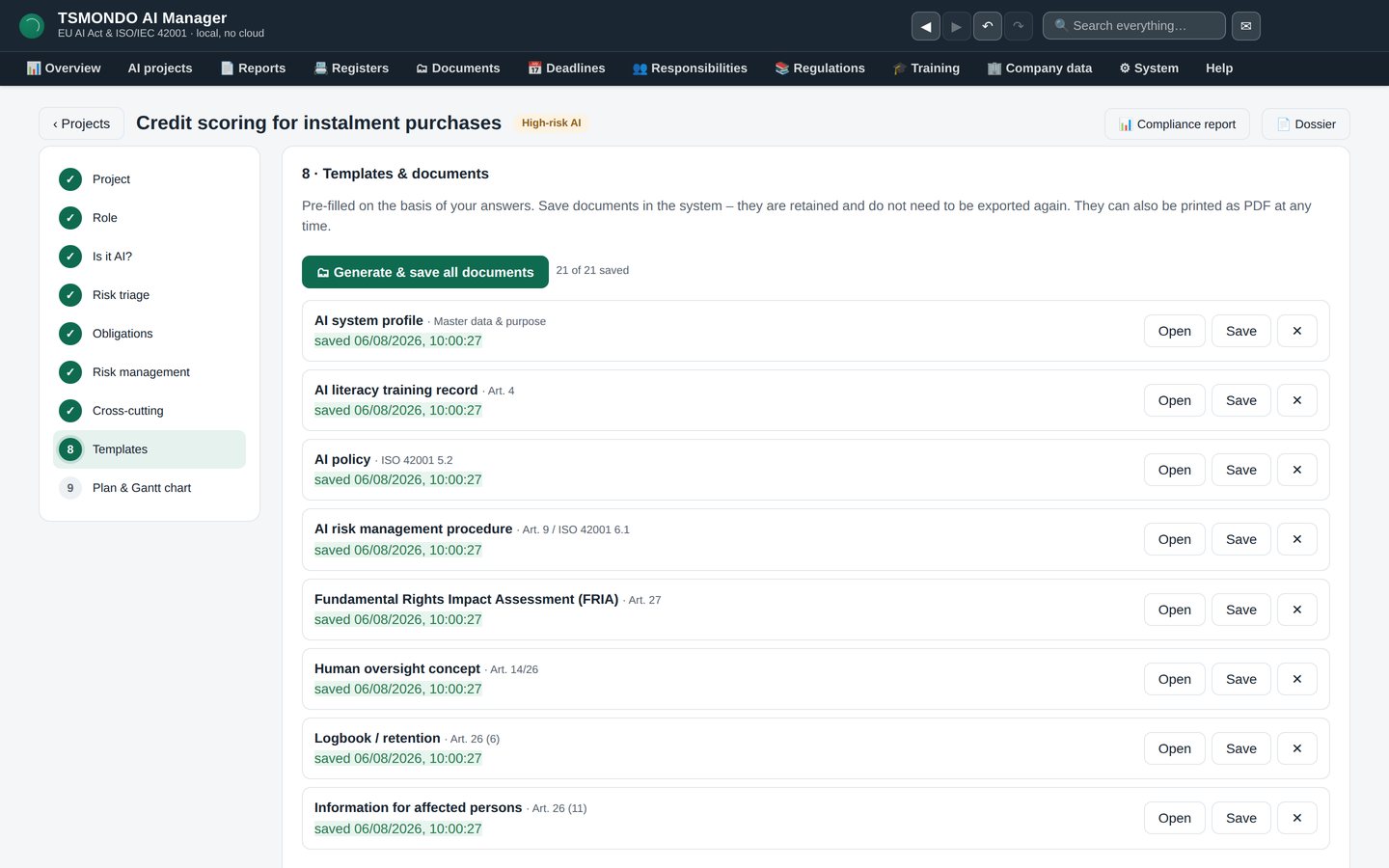
Filled in, not blank
The documents this project needs draft themselves from what you already answered, saved and ready to open — you edit them, you do not start them.
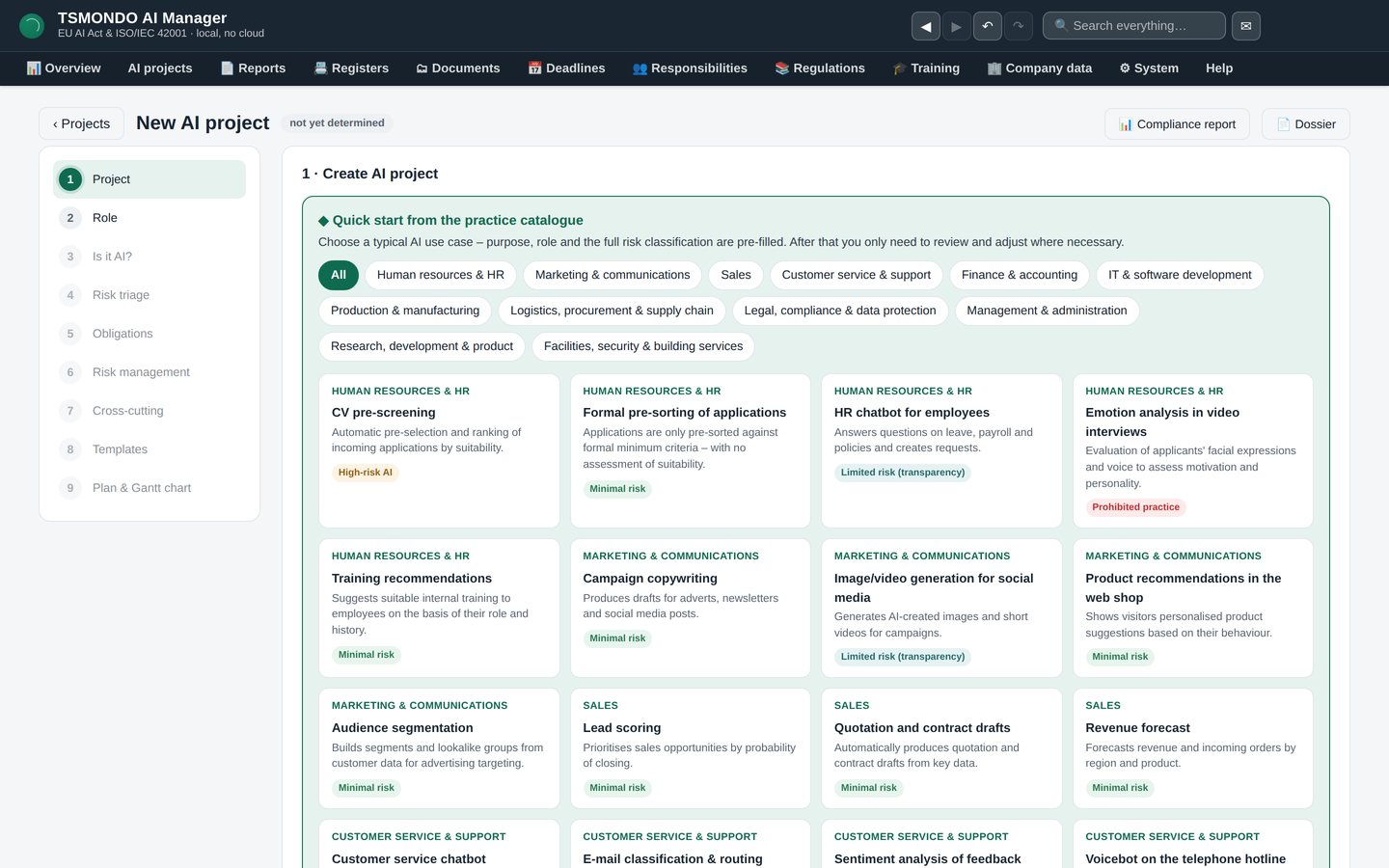
Start from a catalogue
Pick the use case closest to yours and its purpose, role and risk class are already filled in — you adjust, rather than start from nothing.
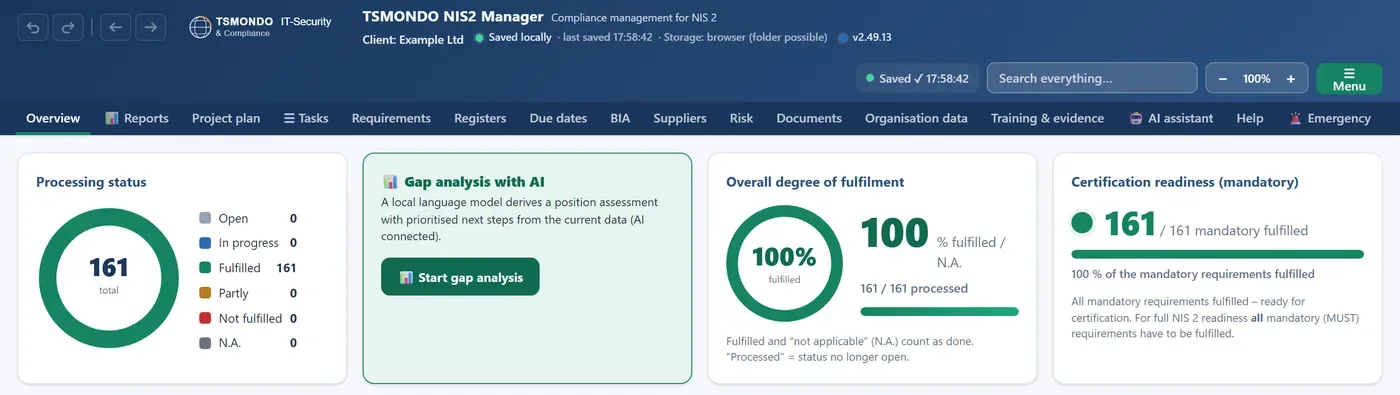
The local model at work
In the NIS2 Manager the same local model runs the gap analysis: a position assessment with prioritised next steps, derived from your own data, without anything leaving the machine.
Why it runs locally, and not in a cloud
An AI inventory is a map of where your company automates decisions, on whose data, with which weaknesses. A risk register is a list of what is not yet fixed. Those are not records to paste into somebody else's chat window — and in most organisations that is exactly what an employee would otherwise do, quietly, with a browser tab.
Running the model on the same machine removes the question. There is no account, no API key, no transfer, and therefore no processing agreement to negotiate, no transfer mechanism to justify, and nothing to explain to a customer who asks where their data went. An internet connection is needed once, during setup, to download the runtime and the base model. After that it works offline.
What the installer does
Three steps, automatically, with a progress bar and a plain-language explanation on screen before anything starts:
- Checks for Ollama, the local AI runtime. If it is missing, the installer downloads and installs it silently.
- Allows local access for the TSMONDO apps by setting the OLLAMA_ORIGINS variable. Ollama still listens on this machine only; it cannot be reached from outside.
- Creates the model tsmondo-ki-en and downloads the search model bge-m3. The base model is fetched once, which is where most of the download size and time goes.
At the end it runs a short function test. If the graphics card cannot be used — usually an outdated NVIDIA driver — the setup switches to CPU mode by itself and says so. The assistant then answers more slowly, but it answers.
If you already run the German TSMONDO apps on the same machine, check the model selector under Settings once after installing: both TSMONDO models share a name prefix, and the app picks up whichever was created last.
What it is not
A local model is smaller than the large hosted ones. That is the trade, and it is worth naming plainly rather than discovering it later:
- It writes a usable draft. It does not write a finished document you can sign without reading.
- It does not know your industry, your contracts or your incidents unless they are in the app.
- It is not legal advice, and it does not make an assessment defensible. A regulator asks what you decided and why, not which tool typed the sentence.
- It reproduces no standard text. Neither the AI Manager nor the assistant contains the wording of ISO/IEC 42001 — identifiers and our own explanations, nothing more.
Using it is itself an AI use case
The moment you put a language model in front of your staff, you have an AI system in your organisation — including this one. Under Regulation (EU) 2024/1689 that means working out what role you are in and which obligations follow; under ISO/IEC 42001 it means the use case belongs in your inventory with a purpose, an owner and a risk view.
We would rather say that than sell a tool that quietly creates the obligation it claims to manage. The AI Manager ships with this use case as a template: local drafting assistance, its purpose, its limits and the human review that goes with it. Fill it in, and the assistant has documented itself.
Download
Free, optional, and digitally signed by TSMONDO GmbH with a timestamp, so Windows shows a known publisher instead of a warning.
Windows 10/11, 64-bit · at least 8 GB RAM, 16 GB recommended · roughly 6–10 GB of free disk space · an internet connection once, during setup. The AI Manager itself works fully without the assistant.
Frequently asked questions
Does the assistant send my data anywhere?
No. The model runs on your machine and answers from what is on it. The only network traffic is the one-time download of the runtime and the models during setup.
What does it cost?
Nothing. It is a free add-on to the AI Manager. There is no separate licence, no account and no usage metering.
Do I need a graphics card?
No. A GPU makes answers faster. If none is usable, the setup switches to CPU mode automatically and tells you it has done so.
Which model does it install?
Two: the TSMONDO model tsmondo-ki-en for writing, and bge-m3 for multilingual search inside your own content. The German TSMONDO models are not installed by this package.
Can I remove it again?
Yes, through Windows as with any program. The uninstaller removes the English model and deliberately leaves the shared Ollama settings alone, so a German TSMONDO installation on the same machine keeps working.
Does the AI Manager need it?
No. Every function of the AI Manager works without the assistant. It is drafting help, not a dependency.
Is the installer signed?
Yes, with a timestamped certificate issued to TSMONDO GmbH. Windows shows the publisher name rather than an unknown-publisher warning.
Start with the manager, add the assistant later
The AI Manager has a 7-day free trial, no account needed. The assistant is a separate, free download whenever you want it.